

Tiaris guide
Workstation settings reference
Find each setting's purpose, default, choices, and activation boundary.

Use this reference when deciding what to change, where to change it, and when to check the result. Policy settings establish organization rules. Blueprint settings establish the workstation experience. A Blueprint cannot override a Policy-owned security rule.
Save, deploy, and verify
Section titled “Save, deploy, and verify”- Open the owning Policy or Blueprint from Configuration.
- Read the default and select the intended supported value. Some controls appear only for a compatible Desktop Experience or sign-in method.
- Save the edits, prepare the resulting Blueprint version, and follow the release and approval workflow.
- After deployment, open the computer and choose Verify Blueprint for fresh system checks.
- For settings marked next sign-in, sign out and back in on the workstation before judging the desktop result.
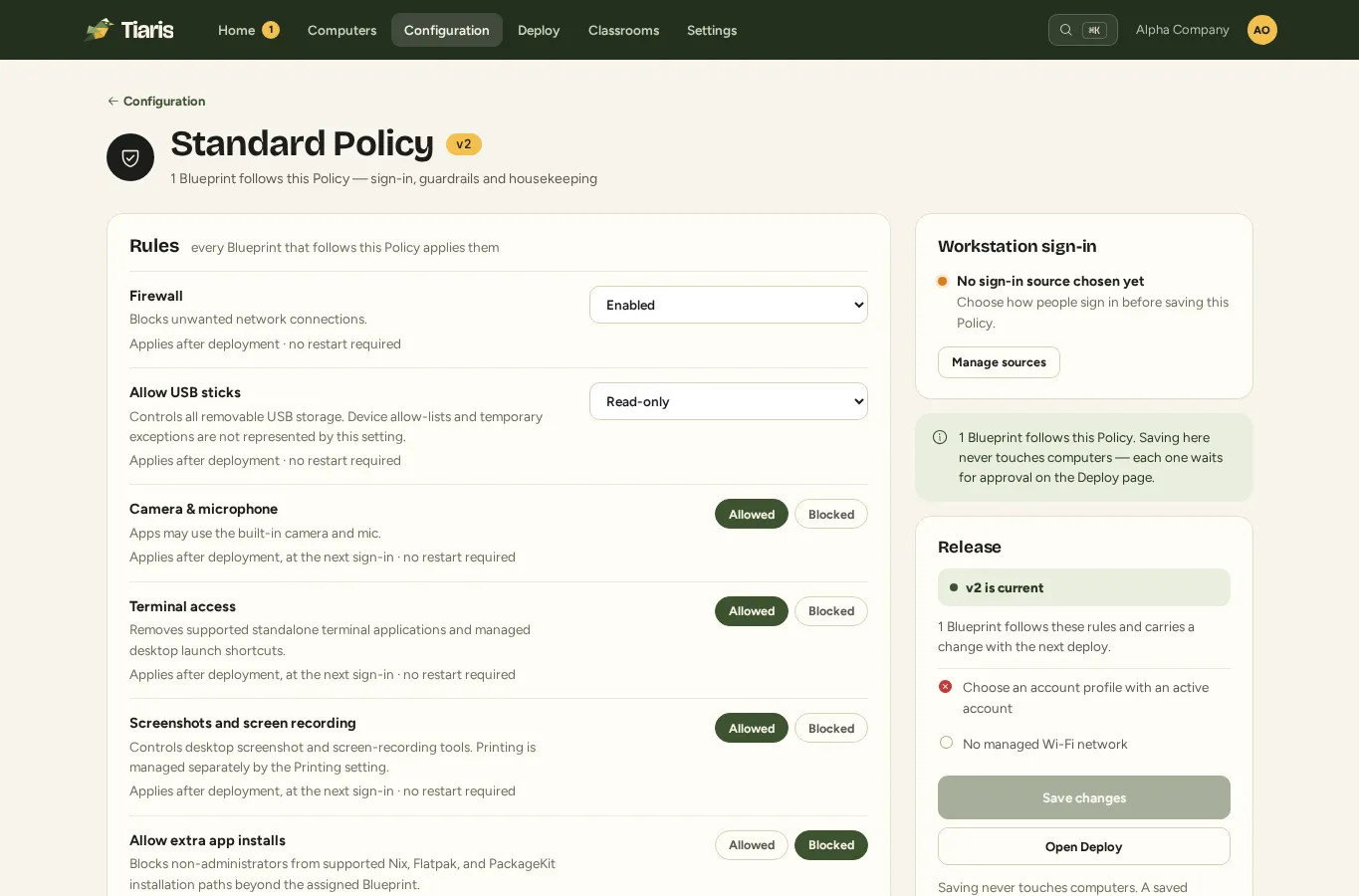
The default describes the catalog’s starting choice. Your existing Policy, organization provisioning defaults, or imported Blueprint may already use another value. The editor’s current value describes what you are actually reviewing.
Policy settings
Section titled “Policy settings”These include sign-in, monitoring, networking, printing, restrictions, security, storage cleanup, and rollback retention. Test a network or sign-in change on a representative computer while keeping a working administrator recovery route.
Wi-Fi networks and their certificates are managed as a separate staged set within the Policy; follow Wi-Fi and certificates.
Offline sign-in
Offline sign-in uses the local password created during the first successful directory-account sign-in.
| Default | Allowed after first sign-in |
|---|---|
| Choices | Allowed after first sign-in · Always verify online |
| Where | Policy > Sign-in |
| Takes effect | At the next sign-in after the approved configuration is applied |
Availability depends on Login method. The editor shows the controls supported by the selected configuration.
Directory login source
Selects the organization directory connection used for workstation sign-in.
| Default | Not set |
|---|---|
| Choices | A supported custom value |
| Where | Policy > Sign-in |
| Takes effect | At the next sign-in after the approved configuration is applied |
Availability depends on Login method. The editor shows the controls supported by the selected configuration.
Sign-in QR code
People can always type the short code on another computer. QR is an optional convenience, never a requirement.
| Default | Web address and code only |
|---|---|
| Choices | Web address and code only · Also show QR code |
| Where | Desktop settings or reviewed import; advanced overrides require Operator access |
| Takes effect | At the next sign-in after the approved configuration is applied |
Availability depends on Login method. The editor shows the controls supported by the selected configuration.
Local Account Profile
Selects the managed local accounts available for local workstation sign-in.
| Default | Not set |
|---|---|
| Choices | A supported custom value |
| Where | Policy > Sign-in |
| Takes effect | At the next sign-in after the approved configuration is applied |
Availability depends on Login method. The editor shows the controls supported by the selected configuration.
Login method
Chooses local or managed-directory authentication for workstation sessions.
| Default | Local login only |
|---|---|
| Choices | Directory workstation login · Local login only |
| Where | Policy > Sign-in |
| Takes effect | At the next sign-in after the approved configuration is applied |
Administrator SSH public keys
One public key per line. Keys authenticate workstation administrators in the wheel group when Remote SSH access is enabled.
| Default | Not set |
|---|---|
| Choices | A supported custom value |
| Where | Policy > Advanced |
| Takes effect | After the approved configuration is applied |
Availability depends on Remote SSH access. The editor shows the controls supported by the selected configuration.
Warnings
Controls warnings on managed workstations.
| Default | Offline > 30m · disk > 90% |
|---|---|
| Choices | Offline > 30m · disk > 90% · Offline > 15m · disk > 85% · Critical only · Disabled |
| Where | Policy > Advanced |
| Takes effect | After the approved configuration is applied |
Health check-in
Choose one reviewed check-in interval. Faster reporting increases control-plane load; one minute is the longest supported interval.
| Default | 30s |
|---|---|
| Choices | 30s · 60s |
| Where | Policy > Advanced |
| Takes effect | After the approved configuration is applied |
DNS resolvers
Sets the ordered IPv4 or IPv6 resolvers applied to managed network connections.
| Default | Not set |
|---|---|
| Choices | A supported custom value |
| Where | Policy > Advanced |
| Takes effect | After the approved configuration is applied |
Web proxy
Controls web proxy on managed workstations.
| Default | None (direct) |
|---|---|
| Choices | None (direct) · A supported custom value |
| Where | Policy > Advanced |
| Takes effect | After the approved configuration is applied |
Default printer
Captured queue name for a printer present in this Policy’s managed printer inventory. It is not a free-form Console choice.
| Default | None |
|---|---|
| Choices | None · A supported custom value |
| Where | Desktop settings or reviewed import; advanced overrides require Operator access |
| Takes effect | After the approved configuration is applied |
Printing
Enables driverless IPP for printers assigned through managed printer inventory. Vendor PPD and arbitrary driver strings are not supported.
| Default | Driverless IPP |
|---|---|
| Choices | Driverless IPP · Disabled |
| Where | Policy > Advanced |
| Takes effect | After the approved configuration is applied |
Browser extensions
Allows signed browser extensions or blocks all extensions. Per-extension allow-lists require a managed extension resource and are not accepted here.
| Default | Allow signed extensions |
|---|---|
| Choices | Allow signed extensions · Blocked |
| Where | Policy > Advanced |
| Takes effect | At the next sign-in after the approved configuration is applied |
Availability depends on Desktop Experience. The editor shows the controls supported by the selected configuration.
Screenshots and screen recording
Controls desktop screenshot and screen-recording tools. Printing is managed separately by the Printing setting.
| Default | Allowed |
|---|---|
| Choices | Allowed · Blocked |
| Where | Policy > Sign-in |
| Takes effect | At the next sign-in after the approved configuration is applied |
Availability depends on Desktop Experience. The editor shows the controls supported by the selected configuration.
Terminal access
Removes supported standalone terminal applications and managed desktop launch shortcuts.
| Default | Allowed |
|---|---|
| Choices | Allowed · Blocked |
| Where | Policy > Sign-in |
| Takes effect | At the next sign-in after the approved configuration is applied |
Availability depends on Desktop Experience. The editor shows the controls supported by the selected configuration.
Allow extra app installs
Blocks non-administrators from supported Nix, Flatpak, and PackageKit installation paths beyond the assigned Blueprint.
| Default | Blocked |
|---|---|
| Choices | Allowed · Blocked |
| Where | Policy > Sign-in |
| Takes effect | At the next sign-in after the approved configuration is applied |
Camera & microphone
Apps may use the built-in camera and mic.
| Default | Allowed |
|---|---|
| Choices | Allowed · Blocked |
| Where | Policy > Sign-in |
| Takes effect | At the next sign-in after the approved configuration is applied |
Firewall
Blocks unwanted network connections.
| Default | Enabled |
|---|---|
| Choices | Enabled · Disabled |
| Where | Policy > Sign-in |
| Takes effect | After the approved configuration is applied |
Password rules
Selects one fully enforced password length and complexity baseline.
| Default | 14+ chars · complexity on |
|---|---|
| Choices | 14+ chars · complexity on · 12+ chars · complexity on · 16+ chars · complexity on |
| Where | Policy > Advanced |
| Takes effect | After the approved configuration is applied |
Idle screen lock
Choose the Policy-owned idle timeout before the session locks.
| Default | 15 min |
|---|---|
| Choices | 5 min · 10 min · 15 min · 30 min · 1h · 24 h |
| Where | Policy > Advanced |
| Takes effect | At the next sign-in after the approved configuration is applied |
Availability depends on Desktop Experience. The editor shows the controls supported by the selected configuration.
Remote SSH access
Controls remote ssh access on managed workstations.
| Default | Disabled |
|---|---|
| Choices | SSH keys only · Disabled |
| Where | Policy > Advanced |
| Takes effect | After the approved configuration is applied |
Allow USB sticks
Controls all removable USB storage. Device allow-lists and temporary exceptions are not represented by this setting.
| Default | Read-only |
|---|---|
| Choices | Blocked · Read-only · Read-write |
| Where | Policy > Sign-in |
| Takes effect | After the approved configuration is applied |
Downloads cleanup
Controls downloads cleanup on managed workstations.
| Default | Off |
|---|---|
| Choices | Off · Purge after 7 days · Purge after 30 days · Purge after 90 days |
| Where | Policy > Advanced |
| Takes effect | After the approved configuration is applied |
Clear shared sessions on logout
Wipes the complete home-directory contents and temporary files of each non-system user after logout on shared devices.
| Default | Off (assigned device) |
|---|---|
| Choices | On logout (shared) · Off (assigned device) |
| Where | Policy > Advanced |
| Takes effect | At the next sign-in after the approved configuration is applied |
Rollback generations
Controls retained boot generations; activation still validates with nixos-rebuild before switch.
| Default | Keep previous generations for rollback |
|---|---|
| Choices | Keep previous generations for rollback · Disabled |
| Where | Policy > Advanced |
| Takes effect | After the approved configuration is applied |
Blueprint settings
Section titled “Blueprint settings”These include Desktop Experience, appearance, bundled apps, input, language, kiosk behavior, and power scheduling. Raw desktop overrides are intended for reviewed imports and authorized operators; routine administrators should use the supported Configure… dialog.
Appearance enforcement
Controls whether wallpaper and theme choices are enforced or supplied as user-changeable defaults. Security settings remain enforced.
| Default | Enforced |
|---|---|
| Choices | Enforced · Defaults only |
| Where | Blueprint > Desktop Experience |
| Takes effect | At the next sign-in after the approved configuration is applied |
Availability depends on Desktop Experience. The editor shows the controls supported by the selected configuration.
Bluetooth
Disabled turns off Bluetooth support in generated Nix.
| Default | Enabled |
|---|---|
| Choices | Enabled · Disabled |
| Where | Blueprint > Desktop Experience |
| Takes effect | After the approved configuration is applied |
Desktop apps
Bundled desktop applications the Blueprint keeps for its Desktop Experience: Default keeps every app the desktop installs, None drops all curatable ones, otherwise a comma-separated list of kept package references. Chosen on the Blueprint beneath the Desktop Experience; App Lists never carry it.
| Default | Default |
|---|---|
| Choices | A supported custom value |
| Where | Desktop settings or reviewed import; advanced overrides require Operator access |
| Takes effect | At the next sign-in after the approved configuration is applied |
GNOME system settings
Applies validated GNOME dconf overrides through the managed desktop configuration.
| Default | Not set |
|---|---|
| Choices | Supported desktop controls or an authorized, reviewed import |
| Where | Desktop settings or reviewed import; advanced overrides require Operator access |
| Takes effect | At the next sign-in after the approved configuration is applied |
GNOME captured defaults
Applies validated GNOME preferences imported from a reference computer as user-changeable system defaults.
| Default | Not set |
|---|---|
| Choices | Supported desktop controls or an authorized, reviewed import |
| Where | Desktop settings or reviewed import; advanced overrides require Operator access |
| Takes effect | At the next sign-in after the approved configuration is applied |
Default applications
Applies validated MIME-type and URL-scheme default application associations.
| Default | Not set |
|---|---|
| Choices | Supported desktop controls or an authorized, reviewed import |
| Where | Desktop settings or reviewed import; advanced overrides require Operator access |
| Takes effect | At the next sign-in after the approved configuration is applied |
GNOME onboarding
Controls GNOME's first sign-in onboarding: the Initial Setup wizard and GNOME Shell's welcome tour.
| Default | Disabled |
|---|---|
| Choices | Enabled · Disabled |
| Where | Blueprint > Desktop Experience |
| Takes effect | At the next sign-in after the approved configuration is applied |
Availability depends on Desktop Experience. The editor shows the controls supported by the selected configuration.
Hyprland system settings
Applies validated Hyprland option lines after the managed base configuration.
| Default | Not set |
|---|---|
| Choices | Supported desktop controls or an authorized, reviewed import |
| Where | Desktop settings or reviewed import; advanced overrides require Operator access |
| Takes effect | At the next sign-in after the approved configuration is applied |
Hyprland captured defaults
Applies validated Hyprland preferences imported from a reference computer before enforced Blueprint settings.
| Default | Not set |
|---|---|
| Choices | Supported desktop controls or an authorized, reviewed import |
| Where | Desktop settings or reviewed import; advanced overrides require Operator access |
| Takes effect | At the next sign-in after the approved configuration is applied |
Keyboard layout
Controls keyboard layout on managed workstations.
| Default | US |
|---|---|
| Choices | US · US (International) · UK · DE · NL · FR |
| Where | Blueprint > Desktop Experience |
| Takes effect | At the next sign-in after the approved configuration is applied |
Kiosk start page
Controls kiosk start page on managed workstations.
| Default | about:blank |
|---|---|
| Choices | A supported custom value |
| Where | Blueprint > Desktop Experience |
| Takes effect | At the next sign-in after the approved configuration is applied |
Availability depends on Desktop Experience. The editor shows the controls supported by the selected configuration.
Language and locale
Controls language and locale on managed workstations.
| Default | en-US |
|---|---|
| Choices | en-US · en-GB · nl-NL · de-DE · fr-FR · es-ES |
| Where | Blueprint > Desktop Experience |
| Takes effect | At the next sign-in after the approved configuration is applied |
Desktop Experience
Selects one supported workstation experience. The desktop environment, greeter, shell, launcher, terminal, portals, screenshots, and layout are derived from this preset.
| Default | Taskbar |
|---|---|
| Choices | Taskbar · Dock · GNOME Overview · Tiling · Sway · Kiosk · Minimal GNOME · No desktop |
| Where | Blueprint > Desktop Experience |
| Takes effect | After the approved configuration is applied; a restart is required |
Scheduled sleep
Suspends the computer every day at the chosen time; Off disables the schedule.
| Default | Off |
|---|---|
| Choices | Off · 15:00 · 16:00 · 17:00 · 18:00 · 20:00 |
| Where | Blueprint > Desktop Experience |
| Takes effect | After the approved configuration is applied |
Availability depends on Desktop Experience. The editor shows the controls supported by the selected configuration.
Theme
Selects one tested appearance pack across supported desktop experiences.
| Default | System default |
|---|---|
| Choices | System default · Tiaris Graphite · WhiteSur |
| Where | Blueprint > Desktop Experience |
| Takes effect | At the next sign-in after the approved configuration is applied |
Availability depends on Desktop Experience. The editor shows the controls supported by the selected configuration.
Timezone
Controls timezone on managed workstations.
| Default | UTC |
|---|---|
| Choices | UTC · America/New_York · America/Chicago · America/Los_Angeles · Europe/Amsterdam · Europe/London · Europe/Berlin |
| Where | Blueprint > Desktop Experience |
| Takes effect | After the approved configuration is applied |
Wallpaper
Selects an organization-owned JPEG from the wallpaper library, or leaves the operating-system default in place.
| Default | Not set |
|---|---|
| Choices | A supported custom value |
| Where | Blueprint > Desktop Experience |
| Takes effect | At the next sign-in after the approved configuration is applied |
Availability depends on Desktop Experience. The editor shows the controls supported by the selected configuration.
Recognize supported and unavailable evidence
Section titled “Recognize supported and unavailable evidence”The editor limits controls to the selected desktop. A value retained for another desktop does not imply that desktop is installed. A Custom value may need Operator review because the normal control cannot represent it.
System checks decide whether the managed configuration passes or drifts. Desktop session observations separately report showing the managed value, pending sign-in, or unobservable. An unavailable session observation does not turn a passed system check into drift.
If the result differs, use Diagnostics and checks and Deployment and desktop problems. Runtime-dependent settings are available only after the compatible signed workstation runtime is installed; see Versions and compatibility.