

Tiaris guide
Get support
Collect the right context and diagnostic evidence for your administrator or approved support contact.

Use the support contact supplied by your organization or reseller. A useful request explains the problem, identifies the affected resource, and includes evidence from the relevant attempt.
Start with the visible instruction
Section titled “Start with the visible instruction”Check Home for work needing attention, then open the affected computer, deployment, or Nest issue. Follow a specific offered action when appropriate. If the system is already retrying safely, keep the computer connected and record what it is waiting for.
Use common problems for quick checks. Repeated retries, restarts, or reinstall requests can make a failure harder to relate to its original evidence.
What to include
Section titled “What to include”| Information | Useful example |
|---|---|
| Organization and environment | The selected organization and the Tiaris address you were using. |
| Resource | Computer display name/hostname, Blueprint/version, deployment, or Nest name. |
| Time | Approximate occurrence time and your timezone. |
| Intended action | “I approved a test deployment of Standard Workstation v4.” |
| Expected and actual result | “The update completed, but the wallpaper still shows the previous image.” |
| Visible state | The exact failed stage, blocker, check reason, or pending sign-in message. |
| Reproduction | The shortest steps that reliably show the problem and how many computers are affected. |
| Evidence | Relevant screenshots, filtered activity export, and an available support package. |
For a feature request, describe the task you need to complete and the current obstacle. Include a concrete example of the desired result.
Collect workstation evidence
Section titled “Collect workstation evidence”Open the computer’s Diagnostics, select the relevant command, and download its support package when available. On an older runtime, use the supported support-log collection path.
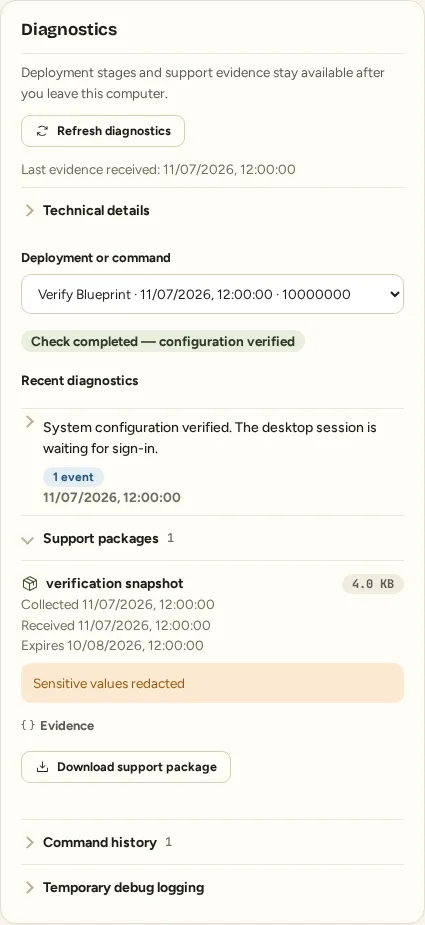
Include the original activation error and any rollback error separately. Mention when a source was unavailable, a package expired, or evidence was truncated. A missing diagnostic package is a reporting limitation, not a successful outcome.
Share only the intended material
Section titled “Share only the intended material”Use your organization’s approved transfer location for downloaded evidence. Keep passwords, private keys, access tokens, reset/setup links, and recovery codes out of the request. Review a screenshot before sharing it, especially when it shows account or certificate controls.
After a fix is delivered
Section titled “After a fix is delivered”Ask which management, Nest, or workstation release contains the fix and which installation prerequisite applies. A fix deployed in development is not proof that it is available in your production environment.
Install or approve the applicable release through the normal process, reproduce the original steps, and tell support whether the expected result now holds. Include the installed versions and fresh evidence if the problem continues.